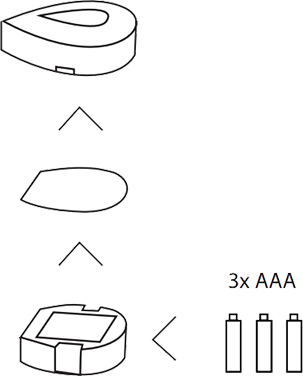
To replace the battery, push the two clips underneath the water detector toward each other and lift the top of the base. Click the insert on the base release.
Replace the battery, observing correct polarity. (Insert the plus and minus on the right side) Insert three AAA batteries into the battery compartment of the water detector. If it beeps once after inserting the batteries, you do not have to perform the pairing process. Associated detectors remember their codes during replacing the batteries.
The water detector does not beep. Make sure the batteries are properly and try again. Otherwise you would have to re-link the water detector in the HomeWizard link
Was this article helpful?
That’s Great!
Thank you for your feedback
Sorry! We couldn't be helpful
Thank you for your feedback
Feedback sent
We appreciate your effort and will try to fix the article