Warning: Only install this device if you are familiar with electrical installations and the dangers they can impose. Disregarding the safety precautions can cause serious injuries
Power supply/Breaker box |  | Solar PanelsHeat PumpCar Charger |
1. Installation
| Uitgebreiden uitleg |
|---|
 Step 1 : Turn off power Step 1 : Turn off power
Work safely!Before beginning the installation ensure that incoming power is disabled and that there is enough place to install the kWh meter in your breaker box. Open the breaker box and verify with a multimeter there is no voltage on your group.
Solar panels: Often there is another breaker box located next to the solar panel converter. Make sure this is also disabled. |
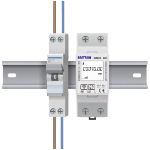 Step 2 : Place the kWh meter Step 2 : Place the kWh meter
Mount the kWh meter on the DIN-rail
Determine the group you want to measure and place the kWh meter as close as possible to this group on the DIN-rail. Do not forget to click the kWh meter in place. |
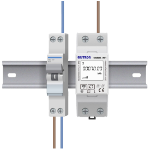 Step 3 : Terminal 2 (L-out) Step 3 : Terminal 2 (L-out)
Live cable of device you want to measure
Unscrew the brown live cable going to the device or group from the breaker. Attach this cable to terminal 2 (L-out) on the kWh meter. |
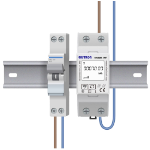 Step 4 : Terminal 4 (N-out) Step 4 : Terminal 4 (N-out)
Neutral cable of device you want to measureUnscrew the blue neutral cable going to the device from the breaker. Attach this cable to terminal 4 (N-out) on the kWh meter. |
 Step 5 : Terminal 3 (N-in) Step 5 : Terminal 3 (N-in)
Connect the kWh meter to the breaker.
Connect the neutral terminal on the breaker with terminal 3 (N-in) on the kWh meter. |
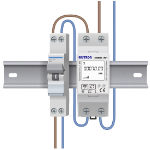 Step 6 : Terminal 1 (L-in) Step 6 : Terminal 1 (L-in)
Connect the kWh meter to the breaker.
Connect the live terminal on the breaker with terminal 1 (L-in) on the kWh meter. |
Step 7 : Turn on powerReplace the protection cap of the breaker box and enable incoming electricity. The screen on the kWh meter will now turn on. |
2. Install the HomeWizard Energy app
Go to the App- or Playstore and search for "HomeWizard Energy", or click the buttons below to download the correct app for your device.
| HOMEWIZARD ENERGY |
|---|
 | For Apple iPhone and iPad |
For Android Smartphones |
- Follow the steps in the App to create a HomeWizard account (only for new users).
- Go to add a new device and select the kWh meter and follow the steps to add the kWh meter to your Energy app.
Manual
Download de HomeWizard kWh Meter manual below ;