If you get the following error message;
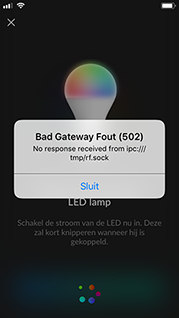
'De 502 melding Bad Gateway:
No response received from ipc:///tmp/rf.sock'
Indicates that your Link is not up to date. This can cause multiple problems, such as devices becoming unresponsive, or pairing of devices being unsuccessful.
How can I solve this issue?
- Make sure the HomeWizard Link App have the latest app version
- Check in the HomeWizard Link the app an update firmware is ready for your link to solve this problem. This is shown in a blue card.
- Open de
 'HomeWizard link' app
 - Ga naar
 'Mijn huis' rechtsonder op het scherm. (automatisch bij openen van de app)
 - Press in the blue update card and then on 'Installeer update'
- Open de
- Can not you see an update on the 'my house' page? Remove the adapter from the HomeWizard Link from the wall socket and wait for 10 seconds. Then place the adapter back in the wall socket. Check that both blue indicators are blue. This indicates that the HomeWizard Link is starting up. The new firmware should be available within an hour.
Need more help
No firmware available within an hour?; Then contact our technical support desk.
Was this article helpful?
That’s Great!
Thank you for your feedback
Sorry! We couldn't be helpful
Thank you for your feedback
Feedback sent
We appreciate your effort and will try to fix the article